What Is a Crypto Token Approval? A Beginner’s Wallet Safety Guide
Using a decentralized exchange or another crypto app often requires more than connecting a wallet. Before the app can swap, deposit, lend, or stake certain tokens, it may ask for permission to access them.
That permission is called a crypto token approval. It is a normal part of many blockchain applications, but it can also create risk when the permission is too large, left active for too long, or granted to a malicious smart contract.
Beginners sometimes approve a request without understanding what it allows. Others assume that disconnecting a wallet removes every permission. It usually does not.
This guide explains how token approvals work, why decentralized applications request them, how to review spending limits, and how to revoke permissions you no longer need.
Quick Answer
A crypto token approval is permission that allows a smart contract or blockchain application to spend a specific type of token from your wallet, up to an approved limit.
For example, before a decentralized exchange can swap an ERC-20 token, you may need to approve its smart contract to access that token. The approval does not normally reveal your private key, but it can remain active on the blockchain after you leave the website.
Approvals are not automatically dangerous. The safest approach is to use trusted applications, approve only the amount needed, review every request, and revoke old or suspicious permissions.
Key Takeaways
- A crypto token approval gives a smart contract permission to spend a particular token.
- The permission applies to a specific token, spender, wallet, and blockchain network.
- Connecting a wallet and approving token spending are different actions.
- Disconnecting a wallet from a website may not remove an on-chain token allowance.
- An unlimited approval can remain active until it is changed or revoked.
- A malicious or compromised contract may misuse an active allowance.
- Revoking an approval usually requires an on-chain transaction and network fee.
- Native blockchain coins and tokens do not always use the same approval process.
- Verify the application, contract, network, token, and spending limit before approving.
- Regular approval reviews can reduce unnecessary wallet risk.
Crypto Token Approval Beginner Facts
| Question | Beginner-friendly answer |
|---|---|
| What is it? | Permission for a smart contract to spend a specific token |
| Why is it requested? | So a dapp can swap, deposit, stake, lend, or otherwise use tokens |
| Does it expose a private key? | No, but it can authorize token spending |
| Is connecting a wallet the same? | No; connection and token approval are separate permissions |
| Can approval stay active? | Yes, until it expires, is used up, is changed, or is revoked |
| What is an allowance? | The maximum token amount a spender is permitted to use |
| What is unlimited approval? | A very large allowance intended to avoid repeated approval transactions |
| Does revoking cost a fee? | Usually yes, because it changes blockchain data |
| Can one approval access every token? | Normally no; approvals are generally token-specific |
| Best beginner habit | Approve only what is needed and review permissions regularly |
What Is a Crypto Token Approval in Simple Terms?
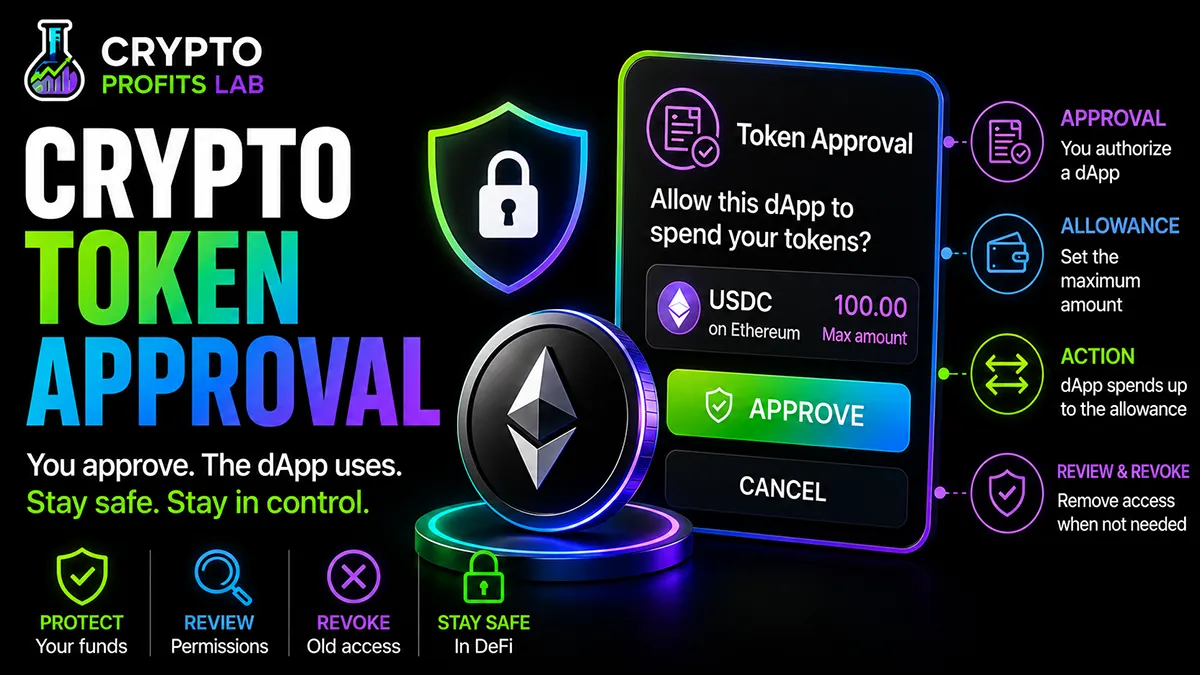
A crypto token approval is an on-chain permission. It tells a token’s smart contract that another address—usually a decentralized application’s smart contract—is allowed to spend some of your tokens.
MetaMask describes a token approval as permission for a dapp to access and move a specific token type from a wallet. The permission is commonly represented by an allowance, which sets how much the approved spender can use.
Think of it like giving a trusted business permission to charge a debit card, but with an important difference: blockchain permissions may remain active until you deliberately change or revoke them.
The app does not receive your crypto private key. Instead, your wallet signs a transaction that records the permission on the blockchain.
A crypto token approval is common when using decentralized finance, but “common” does not mean “approve without reading.” You should understand who is requesting access, which token is involved, and how much can be spent.
Why Do Decentralized Apps Need Token Approvals?
A decentralized application, often called a dapp, cannot simply take tokens from your wallet. The token contract needs authorization first.
Suppose you want to swap 100 units of an ERC-20 token on a decentralized exchange. The exchange’s smart contract must be able to transfer those tokens from your wallet into the swap process.
The usual beginner flow looks like this:
- You connect your wallet to the dapp.
- You choose the token and amount.
- The dapp requests a crypto token approval.
- You approve a spending limit.
- The approval transaction is recorded.
- You submit the separate swap, deposit, or staking transaction.
This system supports many activities explained in the guides to what is DeFi, what is a DEX, and liquidity pools in crypto.
The approval is not the swap itself. It only creates permission for the later action.
How Crypto Token Approvals Work Step by Step
Understanding the basic roles makes the process much easier.
Step 1: Your Wallet Owns the Tokens
Your wallet address holds tokens recorded by a smart contract. For an ERC-20 token, the contract keeps track of balances and allowed spenders.
Step 2: A Dapp Requests Access
You choose an action such as swapping, lending, depositing, staking, or adding liquidity. The dapp tells your wallet that its contract needs permission to use a token.
Step 3: Your Wallet Shows an Approval Request
The request may display:
- The token being approved
- The spender or contract address
- The spending cap
- The blockchain network
- The estimated network fee
Wallet interfaces vary. Some show a clear human-readable limit, while others provide more technical contract details.
Step 4: You Review and Sign
If you approve the request, your wallet signs and broadcasts a crypto transaction that updates the token allowance.
Signing the approval does not usually transfer the tokens immediately. It creates permission.
Step 5: The Network Records the Allowance
After the transaction is confirmed, the token contract records that the spender can use tokens up to the approved amount.
You can track the approval using its crypto transaction hash on a compatible explorer.
Step 6: The Dapp Performs the Requested Action
You may then need to approve a second transaction for the swap, deposit, lending action, or liquidity position.
The dapp’s contract can use the earlier allowance as part of that transaction.
Step 7: Any Remaining Allowance May Stay Active
If the allowance was larger than the amount used, the unused permission may remain available.
That remaining crypto token approval can matter later if the contract is malicious, compromised, upgraded, or used through a deceptive interface.
What Is a Token Allowance?
A token allowance is the amount that an approved spender may transfer from your wallet.
The three main pieces are:
- Owner: your wallet address
- Spender: the approved smart contract or address
- Allowance: the permitted token amount
For example, your wallet might own 500 tokens and approve a DEX contract to spend 100. The contract cannot normally use more than the allowance under that approval.
If it spends 60, the remaining allowance may be 40, depending on the contract and token behavior.
The term “approval” describes the permission-setting action. “Allowance” usually describes the amount currently permitted.
Beginners will often see the words used together because a crypto token approval creates or changes an allowance.
Exact Approval vs. Unlimited Approval
A wallet may let you approve an exact amount or a very large amount.
Exact Approval
An exact approval limits the dapp to the amount needed for the current action.
If you plan to swap 50 tokens, you approve 50.
This limits exposure and makes the permission easier to understand. You may need another approval transaction for a future action, which can cost another network fee.
Unlimited Approval
An unlimited crypto token approval usually sets an extremely high allowance. It is not literally infinite in the mathematical sense, but it is so large that the wallet is unlikely to reach the limit.
This can reduce repeat transactions and fees. However, the permission may remain active for a long time, expose tokens added later, and give a malicious or compromised spender access to a much larger amount.
For beginners, using a custom spending cap close to the amount needed is generally the more cautious choice.
Does a Token Approval Move Your Crypto?
Not by itself in the normal ERC-20 approval process.
A crypto token approval grants permission. A later transfer action can use that permission to move tokens.
This difference explains why many dapps require two wallet confirmations:
- Approve the token.
- Perform the actual swap or deposit.
However, you should still treat the approval as important. Permission to move tokens can be nearly as serious as moving them, especially when the allowance is large and the spender cannot be trusted.
Read every wallet prompt. A scam site may present a dangerous approval while claiming that you are only verifying your wallet, claiming a reward, or checking eligibility.
Crypto Token Approval vs. Connecting a Wallet
Connecting a wallet usually allows a website to see your public address, request your balance, and ask you to sign actions.
A connection does not automatically give the website permission to spend every token.
A crypto token approval is a separate on-chain permission recorded by the token contract. It may continue to exist after the website is closed or disconnected.
This difference is important:
- Disconnecting removes or limits the website connection.
- Revoking changes the on-chain token allowance.
Simply disconnecting a dapp may not protect tokens covered by an existing approval. To remove the spending permission, you normally need to revoke the allowance on the correct blockchain network.
Crypto Token Approval vs. Signing a Message
A message signature and an approval transaction are also different.
A basic message signature may prove that you control a wallet without changing blockchain data. It often does not require a network fee.
A crypto token approval changes an on-chain allowance and normally requires a transaction fee.
However, not every signature is harmless. Some typed-data signatures can authorize advanced actions, permits, listings, or token permissions. The wording and displayed details matter.
Never sign a request only because it says “message.” Confirm the website, purpose, domain, token, amount, expiration, and contract details when available.
If a wallet cannot clearly explain a request, cancel it and investigate before continuing.
Are Native Coins Covered by Token Approvals?
Not always. Native coins such as ETH are built directly into their blockchains, while ERC-20 approvals mainly apply to tokens created by smart contracts. Wrapped versions of native coins are tokens and may use approvals.
The wallet request should identify the exact asset. The guide to what is ERC-20 explains this token standard in more detail.
Why Can Old Token Approvals Be Risky?
An old approval may remain active after you stop using an application. Risk can increase if the contract was malicious, later develops a vulnerability, is compromised, or received a larger allowance than you intended.
A dormant crypto token approval does not guarantee theft. It creates an unnecessary permission that may expose tokens held now or added to the wallet later. Revoking permissions you no longer need reduces the number of contracts that can use your tokens.
How to Review Token Approvals Safely
Use a trusted wallet feature, blockchain explorer, or established approval-checking tool that supports your network.
Check the correct wallet address and blockchain network, then review each token, spender, and allowance. Scam tokens can copy legitimate names and symbols, so verify contract addresses when needed.
Give extra attention to unlimited permissions and unfamiliar applications. Revoke access you no longer trust or need, then use a trusted blockchain explorer to confirm the revocation succeeded.
How to Revoke a Crypto Token Approval
The exact buttons differ among wallets and networks, but the general process is similar.
Step 1: Open a Trusted Approval Manager
Use your wallet’s official approval-management feature or reach a reputable explorer through a saved bookmark or official project link.
Avoid searching for “revoke crypto approval” and clicking an unverified advertisement. Fake revocation sites are common scam opportunities.
Step 2: Connect or Enter the Public Address
Some tools can display approvals using only a public address. Others require a wallet connection to prepare the revocation transaction.
Viewing a public address should not require your seed phrase.
Step 3: Choose the Network
Select the blockchain where the approval exists.
Step 4: Review the Token and Spender
Confirm the token contract, spender, allowance, and dapp identity.
Step 5: Select Revoke
A revocation generally changes the allowance to zero or another lower value.
Step 6: Review the Wallet Transaction
Check the network, contract, action, and fee. The revocation itself is an on-chain transaction.
Step 7: Confirm and Wait
After signing, wait for network confirmation. Network fees may apply, as explained in What Are Crypto Gas Fees.
Step 8: Verify the Result
Refresh the approval manager or check the transaction on an explorer. Confirm that the allowance is now zero or reduced.
Revoking a crypto token approval does not return fees already paid or reverse earlier transactions. It only changes future spending permission.
Does Revoking an Approval Cost Money?
Usually, yes.
A revocation changes blockchain data, so it normally requires an on-chain transaction. The network may charge a fee even though you are not sending tokens to another person.
The cost depends on the blockchain, network demand, and transaction design.
Do not let a small fee pressure you into using an unknown revocation website. A fake tool can create a much larger loss.
When fees are unusually high, you may choose to wait if there is no immediate danger. If the approval appears malicious and valuable tokens are exposed, faster action may be more important than saving on fees.
How Malicious Token Approvals Work
A malicious website may imitate a legitimate exchange, airdrop, NFT project, staking service, or wallet support page.
The site asks you to connect your wallet and approve a token. The request may be disguised as:
- Claiming an airdrop
- Verifying wallet ownership
- Unlocking an account
- Migrating tokens
- Fixing a failed transaction
- Receiving a refund
- Joining a presale
- Activating staking rewards
The approval may authorize a scammer-controlled contract to spend valuable tokens.
Once the crypto token approval is confirmed, the attacker may use the allowance immediately or wait until the wallet receives more tokens.
This is why a wallet transaction can be dangerous even when no funds leave at the moment you sign it.
Token Approval Safety and Risk Tips
Verify the Website
Use saved bookmarks or official project links. Be cautious with search advertisements, social-media replies, direct messages, and look-alike domains.
Read the Wallet Prompt
Confirm the token, spender, network, and spending cap.
Limit the Amount
Use a custom allowance near the amount needed when the wallet supports it.
Avoid Unnecessary Unlimited Approvals
Convenience should not automatically outweigh safety.
Review Approvals Regularly
Check active permissions after trying a new dapp and during routine wallet maintenance.
Separate Wallet Purposes
Some users keep long-term holdings in one wallet and use a smaller wallet for dapp interactions.
A hardware wallet can protect private keys, but you must still avoid approving malicious contracts.
Ignore Urgent Pressure
Scammers create countdowns and emergency warnings to prevent careful review.
Never Share Recovery Credentials
A legitimate approval tool does not need your seed phrase or private key.
Review the broader crypto safety tips before connecting a wallet to unfamiliar applications.
Common Beginner Mistakes
Assuming Every Approval Is a Payment
An approval creates permission, while a later transaction may use it.
Approving Unlimited Spending Automatically
A large allowance may remain active long after the original action.
Disconnecting Without Revoking
Removing a website connection does not necessarily remove the on-chain crypto token approval.
Trusting a Familiar Token Name
Scam tokens can copy names and symbols. Verify the contract address when the situation matters.
Ignoring the Spender
The token may be legitimate while the spender contract is malicious.
Signing Through a Social-Media Link
Fake support accounts and phishing pages often lead users to dangerous approval requests.
Using the Same Wallet for Everything
Keeping large long-term holdings in a wallet used for experimental dapps increases potential exposure.
Forgetting Other Networks
You may have approvals on several blockchains. Reviewing only Ethereum can miss permissions on compatible networks.
Paying a Fake “Revocation Fee”
A real revocation requires a normal network transaction. Do not send funds directly to someone claiming they must manually remove access.
Believing a Hardware Wallet Approves Safety
The device proves that you authorized the transaction. It cannot decide whether the contract deserves permission.
A Simple Approval Checklist
Before signing a crypto token approval, ask:
- Am I on the official website?
- Do I understand why this app needs the token?
- Is the blockchain network correct?
- Is the token contract correct?
- Who is the spender?
- Is the requested amount reasonable?
- Can I set a smaller spending cap?
- Is the approval unlimited?
- Have I used and verified this dapp before?
- Does the wallet show warnings?
- Am I being rushed by a timer or message?
- Can I cancel and investigate first?
After using the dapp, check whether any unused allowance remains and revoke access you no longer need. A checklist is more reliable than judging safety from a logo or website design.
Final Thoughts
Crypto token approval is a standard tool that allows decentralized applications to work with tokens in your wallet. It is not automatically a scam, but it should never be treated as an unimportant pop-up.
The most important details are the token, spender, blockchain network, and allowance. Approving only the amount needed can reduce risk, while reviewing and revoking old permissions can limit unnecessary exposure.
Remember that connecting a wallet, signing a message, approving a token, and completing a swap are different actions. Slow down and understand which action your wallet is asking you to authorize.
Crypto Profits Lab focuses on making wallet safety understandable without burying beginners in technical language. A few careful approval habits can make DeFi and decentralized apps easier to use with greater confidence.
Crypto Token Approval Frequently Asked Questions
What Is a Crypto Token Approval?
A crypto token approval is an on-chain permission allowing a specific smart contract or address to spend a particular token from your wallet, up to an approved allowance. Dapps commonly request approvals before swaps, deposits, staking, lending, or liquidity actions. The permission may remain active after the original transaction, so review the spender and amount carefully.
Is a Token Approval the Same as Connecting a Wallet?
No. Connecting a wallet usually lets a website view your public address and request actions. A crypto token approval changes an allowance recorded by a token contract. Disconnecting the website may end the visible connection, but an existing allowance can remain active. You normally need a separate on-chain revocation transaction to remove that spending permission.
Can a Token Approval Steal My Crypto?
A legitimate approval does not automatically steal tokens, but it can allow the approved spender to transfer them within the allowance. A malicious or compromised contract may misuse that permission. Risk is greater with unlimited approvals and valuable token balances. Verify the spender and use a limited allowance whenever practical.
What Does Unlimited Token Approval Mean?
Unlimited approval means the allowance is set to an extremely large number so the dapp can continue using the token without asking for a new approval each time. This can save fees and improve convenience, but it also increases exposure if the spender is malicious or compromised. Beginners should consider approving only the amount needed.
Does Revoking a Token Approval Cost Gas?
Usually, yes. Revoking changes the allowance recorded on the blockchain, so it requires an on-chain transaction and network fee. The cost depends on the network and current demand. Use a trusted wallet or explorer tool, verify the transaction details, and never enter your seed phrase into a revocation website.
Does Disconnecting a Dapp Revoke Its Approval?
No, not necessarily. Disconnecting usually removes the website’s current connection to your wallet, but it does not automatically change token allowances stored on the blockchain. Check the wallet address on a trusted approval manager and revoke unnecessary allowances separately. This distinction is one of the most important crypto token approval safety concepts.
Should I Revoke Every Approval After Using a Dapp?
Not always. Keeping a limited approval for a trusted dapp may be convenient if you use it frequently. However, old, unlimited, suspicious, or unnecessary permissions increase exposure without providing much benefit. Review approvals regularly and revoke those connected to dapps you no longer use or contracts you cannot identify.
Can a Hardware Wallet Protect Me From Malicious Approvals?
A hardware wallet protects private keys and requires physical confirmation, but it cannot determine whether a smart contract is trustworthy. You can still authorize a dangerous crypto token approval on the device. Read the transaction details, verify the dapp and spender, limit the allowance, and cancel any request you do not understand.